

That’s right, and its name is Atkinson Hyperlegible, and it is free and available in Google!
Though this font has been around since 2022, you may not have heard of it. It is from the Braille Institute and it increases readability for low-vision readers. To learn more, check out this article from the Braille Institute, “Read Easier With Our Family of Hyperlegible Fonts.”
Here is where you can find this font in Google and start using it in all your documents:
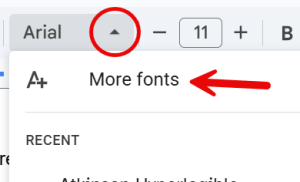
- In your document, click the drop down arrow from the font menu.
- Select More fonts to open the Fonts window.
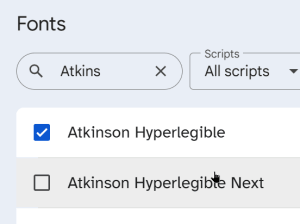
- Start typing the font name in the search box.
- Select Atkinson Hyperlegible and then click Done.
You should now be able to find the font when you go to your font drop down menu.