Jan 24, 2014
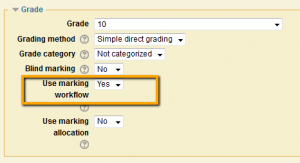
Want to control when students are notified about assignment grades? Now you can with the Use marking workflow setting. In the Assignment settings, under Grade set the Use marking workflow to Yes. Then when grading you can control when grades are released to the...

Jan 24, 2014
Time. There is never enough. But maybe, just maybe you have time to share one sentence. Share an idea or piece of advice that someone mentioned at the copy machine or heard at a conference workshop or read in a book or blog post. Did you receive a tip when you were...

Jan 24, 2014
Meeting a number of deadlines is a fact of life for college students, and missing one can make some feel like it’s time to give up. Be it the demands of work, family, other courses, or a lack of good time awareness and time management, students may miss...

Jan 24, 2014
In our active learning classroom training session on Friday, we discussed some of the tools that could be helpful in an active learning classroom. Some of the things I use are: 2×2 sticky notes…have students write name on one and place on table facing team...

Jan 20, 2014
Here are a few things to consider as we begin the semester: IMPORT your course materials. Find instructions in the Import Course document. UPDATE your assignment dates. There is a handy quick way of updating your assignment and quiz due dates in one location. Find...

