Sep 26, 2013
Posted September 11, 2013 in Inside Higher Ed By Serena Golden Academic dishonesty is not on the rise, James M. Lang argues, despite periodic media flurries suggesting otherwise in the wake of various high-profile cheating scandals. Data on cheating are typically...
Sep 25, 2013
Whether you are showing your presentation to your face-to-face classroom, or uploading your presentation into your online class for student reference, or setting up a presentation for a meeting — keep accessibility in mind. Creating accessible presentations will...
Sep 19, 2013
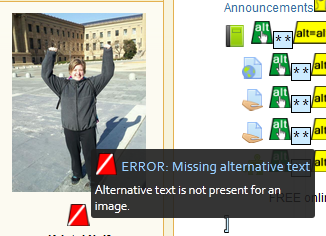
Here’s how you can check your eLearning (Moodle) course for accessibility using the WAVE add-on for Mozilla Firefox. In Mozilla Firefox: Select Tools. Select Add-ons. Select Search – Available Add-ons. Search for WAVE Toolbar. * Select see all ### results...
Sep 12, 2013
Written by: Rob Kelly Published On: September 7, 2013 If you’re having trouble getting students to engage in the discussion forum, perhaps it’s time to rethink how you use this tool. “Think of it as a place to foster interaction between the students through a variety...
Sep 11, 2013
Are images bad for accessibility? “Some people wrongly assume that images are bad for accessibility, since alt text essentially replaces the image with a text-only version of that image. The logical extension of that thought is that text-only sites are ideal for...