Most images can be made accessible using alternative (alt) text descriptions. However, more complex images require more description then the limited one or two brief sentences that may be used in the image alt text area. Start by asking: What information does this...
Faculty & CIE Articles
Accessibility Lunch & Learn: Moodle, Images, Audio & Video
Educational Media Technologies will be holding Accessibility Lunch & Learn sessions again this fall semester. Bring a lunch and come join us each month 12:00pm -1:00pm in Osterlin 113. This fall our sessions are as follows: October 13 - Moodle & Images...
Join a Learning Community
Would you like to work with your colleagues in a collaborative, supportive environment? Would you like to investigate an interesting topic or explore a new practice? If so, consider starting or participating in a learning community. Last year, five learning...
Sign Up for NISODirect for More PD Resources
NMC has long been a member of NISOD, the National Institute for Staff and Organizational Development. As members, we receive many benefits including being able to nominate faculty for the NISOD Excellence Awards, attend the NISOD conference and get professional...
The Sharing Showcase is Looking for Contributors
EMT and CIE are working together to create a video showcase for good ideas and practices here at NMC. We hope that this collection will serve as an in-house professional development video library that we can all consult for practical tips or inspiration. We are hoping...
Scratch Cards are Here
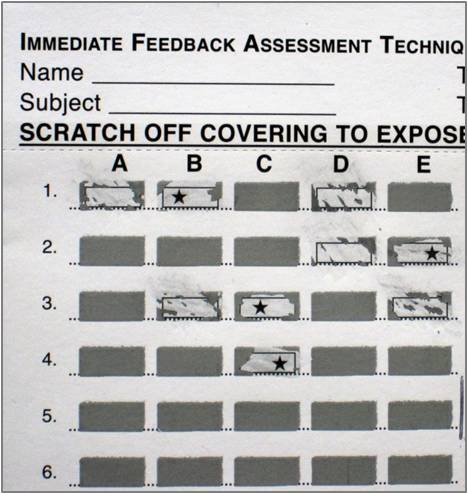
Do you remember the fun group quiz we took at the August PD day? The one with the scratch card answer sheet? Several of you have asked if NMC could get some of these answer cards, so CIE has purchased a batch of them. They are a great way to get students talking and...
Fall 2016 Transfer Fair is October 11
Over 30 university representatives will be on NMC’s campus on Tuesday, October 11 from 9:30 a.m. to 1:00 p.m. to talk with students, staff and faculty about their programs and the transfer process. The university representatives will be in two locations:...
Make a Plan with Your Advisees
The next phase of MAP (MyAcademicPlan) is here! Faculty advisors can use Plans, the digital degree planning tool with student advisees. Accessed from the MAP portal, Plans allows Faculty advisors to create a semester-by-semester outline of courses with students,...
Tips for better screencasts
A screencast is a video and audio recording of your computer screen and all the actions that occur on the screen, like mouse movements, highlights, drawing on a whiteboard, or application switching. Screencasts can be used to record introductions for online classes,...